How NVIDIA GPUs Works Behind The Scene
For decades, the Central Processing Unit (CPU) was the undisputed king of silicon. It was the "brain" of the computer—a brilliant, solitary genius designed to race through complex logic one step at a time. But as the world pivoted toward Deep Learning and Generative AI, we hit a wall. The mathematical problems required to train models like GPT-4 weren’t just complex; they were astronomically large. We didn’t need a solitary genius anymore; we needed an army.
This shift in computing requirements propelled NVIDIA from a maker of video game graphics cards to the engine room of the modern economy. But understanding why these green chips are the gold standard requires looking past the stock price and into the silicon itself. It requires understanding the fundamental difference between latency (speed) and throughput (volume).
In this article we are deconstructing the NVIDIA GPU. From the hierarchy of its memory to the "AI magic" of its Tensor Cores, here is exactly how the hardware powering the AI revolution actually works.
CPU vs. GPU
To understand the GPU, you first have to understand what it isn't.
The CPU (Central Processing Unit) is like a brilliant mathematician. It has a few powerful cores designed to handle complex logic, serial tasks, and operating system management. It is Latency-Oriented—it wants to finish one task as fast as possible before moving to the next.
The GPU (Graphics Processing Unit), conversely, is like an army of thousands of elementary school students. Individual cores are slower than a CPU core, but there are thousands of them. It is Throughput-Oriented.
The process begins with Offloading. The CPU acts as the host/conductor. It prepares the data and sends "Compute-Intensive Tasks" to the GPU. This is where SIMD comes into play: Single Instruction, Multiple Data. One command is issued, and thousands of cores execute it simultaneously on different pieces of data.
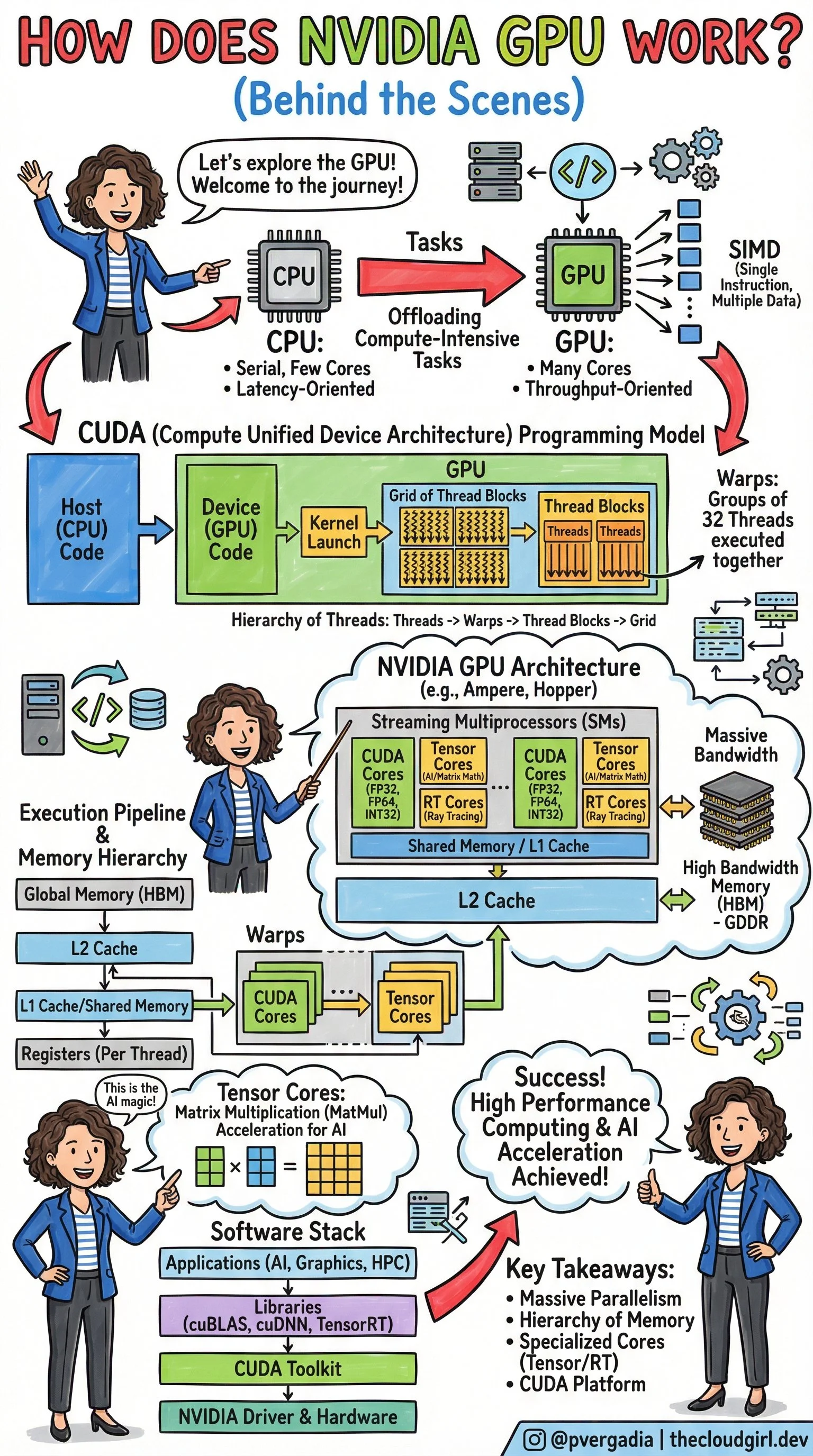
How NVIDIA GPU Works behind The Scene by @pvergadia Cloud Girl
2. The CUDA Model
How do we tell thousands of cores what to do without chaos? We use CUDA (Compute Unified Device Architecture).
When a developer writes code (the Host Code), they write specific functions called Kernels. When a Kernel is launched, the GPU organizes the work into a strict hierarchy to manage the massive parallelism:
Grid: The entire problem space.
Thread Blocks: The grid is divided into blocks.
Warps: This is a crucial hardware concept. Threads are executed in groups of 32 called "Warps." All 32 threads in a warp execute the same instruction at the same time.
Threads: The individual workers processing the data.
3. The Architecture (Ampere, Hopper)
If you zoomed into the silicon, you would see the Streaming Multiprocessors (SMs). These are the workhorses of the GPU. Inside an SM, you find specialized cores for different jobs:
CUDA Cores: For general-purpose floating-point math (FP32, FP64, INT32).
RT Cores: Specialized for Ray Tracing (calculating how light bounces in video games).
Tensor Cores: The "AI Magic" (more on this below).
The Memory Hierarchy
Speed isn't just about processing; it's about feeding the beast. If the cores are waiting for data, they are useless. NVIDIA solves this with a tiered memory architecture:
Global Memory (HBM): High Bandwidth Memory. Massive storage, but slower to access.
L2 Cache: Shared across the GPU.
L1 Cache / Shared Memory: Extremely fast memory located inside the SM, shared by thread blocks.
Registers: The fastest memory, unique to each thread.
4. The Math of AI
Aleksa Gordic has written deep dive into Matrix Multiplication (MatMul) and how it intersects with the physical hardware. At their core, Deep Learning and Large Language Models are essentially giant grids of numbers interacting with one another. You are taking massive amounts of input data and constantly comparing and combining it with the model's learned "weights."
If you try to perform this work on a standard CPU, it is like a librarian trying to organize thousands of books by picking up one book, walking it to the shelf, placing it, and then walking all the way back for the next one. The CPU processes these interactions sequentially—handling one tiny piece of data at a time. It is a painstakingly slow bottleneck.
NVIDIA’s Tensor Cores were designed specifically to break this bottleneck. While a standard core calculates one number at a time, a Tensor Core grabs entire blocks of data and fuses them together in a single instant. By chopping the massive mountain of data into small, manageable "tiles" and keeping those tiles in the chip’s ultra-fast memory, Tensor Cores can churn through AI training tasks exponentially faster than older hardware could ever hope to.
5. The Software Stack
Hardware is essentially a paperweight without software. The sketch outlines the stack that makes this accessible:
NVIDIA Driver & Hardware: The physical foundation.
CUDA Toolkit: The compiler and tools developers use.
Libraries (cuBLAS, cuDNN, TensorRT): Pre-optimized math libraries. Note: cuBLAS is literally the "Basic Linear Algebra Subprograms" library—it handles the MatMul for you so you don't have to write raw CUDA code.
Applications: PyTorch, TensorFlow, Graphics, and HPC apps sit at the top.
Conclusion
The success of AI is the GPU engineering. It comes down to:
Massive Parallelism: Doing thousands of things at once rather than one thing quickly.
Memory Hierarchy: Keeping data as close to the cores as possible to maximize throughput.
Specialization: Using Tensor Cores to accelerate the specific math (Matrix Multiplication) that underpins all Deep Learning.