Month: January 2026

Uncategorized

How DoorDash Built a Voice AI Contact Center That Actually Works

How DoorDash Built a Voice AI Contact Center That Actually WorksJan 17Written By Akhil MohanPicture this: You're a DoorDash driver—a Dasher, as they're called—navigating traffic while trying to find a customer's apartment. Something goes wrong with the app. You need help. Now.You're not going to pull over and type out a detailed support message. You're going to call.This is the reality DoorDash faced when they decided to overhaul their customer support. Hundreds of thousands of calls every single day from Dashers, merchants, and customers—many of them needing answers while literally on the move. And when you're driving for a living, every minute on hold is money lost.So how do you build an AI support system that doesn't feel like talking to a brick wall? That's exactly what DoorDash figured out, and there are some lessons here that anyone building AI applications should pay attention to.Voice AI Is Harder Than TextMost companies that implement AI chatbots start with text. Makes sense—it's easier to prototype, easier to debug, and users can wait a few seconds for a response without feeling like something's broken.Voice is a completely different beast.When you're on a phone call, even a two-second pause feels awkward. Three seconds? You start wondering if the call dropped. Five seconds? You've already hung up and called back.DoorDash already had a decent self-service system running on Amazon Connect with Amazon Lex—the kind of "press 1 for account issues, press 2 for payment questions" setup you've probably used a hundred times. It was working. They'd reduced agent transfers by 49% and saved about $3 million a year in operational costs.But "working" isn't the same as "great." Most calls were still getting routed to human agents. Dashers were spending too much time waiting for help when they needed to be back on the road making deliveries.The question wasn't whether to use generative AI. The question was: how do you make it fast enough for voice?Why Amazon Bedrock?DoorDash partnered with AWS through their Generative AI Innovation Center—a program where AWS pairs companies with their AI experts to build production-ready solutions. Not a proof of concept. Not a demo. Something that could handle hundreds of thousands of real calls.They chose Amazon Bedrock as their foundation, and the reasoning is worth understanding.For beginners: Bedrock is essentially Amazon's "one-stop shop" for accessing large language models. Instead of managing your own infrastructure or figuring out how to deploy models, you get a managed service with multiple AI models available through a single API. Think of it like what AWS did for servers, but for AI models.For practitioners: The real value here isn't just convenience. Bedrock gives you access to multiple foundation models—including Anthropic's Claude family—without vendor lock-in. You can experiment with different models, swap them out, and fine-tune your approach without rebuilding your entire architecture. DoorDash reported a 50% reduction in development time just from using Bedrock instead of building custom integrations.For architects: The security story matters here too. Bedrock provides built-in encryption and ensures that customer data stays within your application boundaries. DoorDash explicitly noted that no personally identifiable information gets passed to the generative AI components—the architecture enforces this separation.Getting the Speed Right with Claude 3 HaikuRemember that latency issue? This is where model selection becomes critical.DoorDash tested multiple models and landed on Anthropic's Claude 3 Haiku for their voice application. The result: response latency of 2.5 seconds or less.Now, 2.5 seconds might sound like a lot if you're used to text chatbots that respond almost instantly. But remember—this isn't just generating a response. The system needs to:Transcribe the caller's speech to textProcess the request and understand the intentSearch the knowledge base for relevant informationGenerate an appropriate responseConvert that response back to speechAll of that in under 2.5 seconds. That's actually impressive.But Haiku wasn't just chosen for speed. Claude models have specific capabilities around hallucination mitigation, prompt injection detection, and identifying abusive language. When you're building a customer-facing voice system that handles hundreds of thousands of calls daily, you really don't want your AI confidently giving wrong information or being manipulated by bad actors.The RAG ArchitectureLet's get into how this actually works.DoorDash implemented Retrieval-Augmented Generation (RAG) using Knowledge Bases for Amazon Bedrock. If you're not familiar with RAG, here's the gist:Instead of asking the AI model to answer questions purely from what it learned during training, you give it access to your company's actual documentation. When a Dasher asks "how do I update my payment information?", the system first searches DoorDash's help center for relevant articles, then feeds that context to Claude along with the question. The model generates an answer based on your actual, up-to-date documentation—not whatever was in its training data.Why this matters:Accuracy: The AI can only answer based on your approved content. If your payment process changed last week, you update the help center, and the AI immediately gives the right answer.Controllability: You're not hoping the model "knows" the right answer. You're ensuring it does.Auditability: You can trace exactly which documents informed any given response.Knowledge Bases for Amazon Bedrock handles the messy parts—ingesting documents, creating embeddings, managing the retrieval workflow, and augmenting prompts. DoorDash didn't have to build custom integrations or manage their own vector database. They pointed the system at their help center and let the managed service handle the plumbing.The Testing Framework That Made It PossibleThis part caught my attention and doesn't get talked about enough.Before this project, DoorDash's contact center team had to pull actual agents off the support queue to manually test new features. They'd have agents call in, go through scenarios, and report back. It was slow, expensive, and couldn't scale.Working with the AWS team, they built an automated testing framework using Amazon SageMaker. The system can now run thousands of tests per hour—a 50x increase from their previous capacity. More importantly, it doesn't just check if the AI responded; it semantically evaluates whether responses are actually correct compared to ground-truth answers.This is the kind of infrastructure investment that separates companies that successfully deploy AI from those that launch something broken and never recover user trust.For teams building similar systems: Don't underestimate testing. Your AI might work perfectly in demos but fail spectacularly on edge cases. Build evaluation frameworks early. Test at scale. Have a way to measure quality beyond "did it respond?"The ResultsLet's look at the numbers DoorDash shared:Hundreds of thousands of calls per day handled by the generative AI solutionThousands fewer escalations to live agents dailyFewer agent tasks required to resolve support inquiries8 weeks from kickoff to live A/B testingThose are real, material improvements. The solution rolled out to all Dashers in early 2024 and has been running in production since.What I find more interesting is what they're planning next.DoorDash mentioned they're working on expanding the knowledge bases (more topics the AI can handle) and integrating with their "event-driven logistics workflow service." Translation: the AI won't just answer questions; it'll take actions on behalf of users.Imagine calling support and instead of just hearing "you can update your payment method in settings," the AI says "I've updated your payment method to the new card. You should see it reflected now."That's a fundamentally different product. And it's where this technology is heading.TakeawaysWhether you're building AI applications, evaluating vendors, or just trying to understand where this technology is going, a few things stand out:Model selection is architecture. Choosing Claude 3 Haiku wasn't just about speed—it was about the full package of latency, accuracy, safety features, and cost. Different use cases need different models.RAG isn't optional for enterprise. If you're building customer-facing AI that needs to give accurate, current information, you need retrieval-augmented generation. Relying purely on model training data is asking for trouble.Voice AI is harder than text AI. The latency requirements alone change everything. If you're thinking about voice applications, budget more time and expect different trade-offs.Testing infrastructure pays dividends. DoorDash's investment in automated evaluation let them iterate faster and deploy with confidence. This is table stakes for production AI.Managed services accelerate deployment. A 50% reduction in development time is significant. Sometimes the right move is to pay for infrastructure that lets you focus on your actual product.Where This Is All HeadingThere's a pattern emerging in how successful companies deploy generative AI: they start with high-volume, repetitive tasks where the cost of errors is manageable and the improvement potential is obvious.Customer support checks all those boxes. Hundreds of thousands of daily interactions. Many questions are routine ("how do I...?"). The existing baseline (hold music) is so bad that even imperfect AI feels like an improvement. And humans remain in the loop for complex issues.DoorDash didn't try to replace their entire support operation with AI. They augmented it. The generative AI handles the straightforward stuff, which frees up human agents to focus on complex problems that actually need human judgment.That's not the flashiest vision of AI, but it might be the most realistic one. Incremental improvements that compound. Real cost savings that fund further development. Gradual expansion of capabilities as the technology matures.Not every AI story needs to be revolutionary. Sometimes, "it works, it saves money, and customers like it better" is exactly the story worth telling.

Read more »

Uncategorized

How NVIDIA GPUs Works Behind The Scene

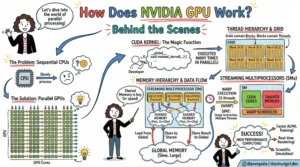
2. The CUDA ModelHow do we tell thousands of cores what to do without chaos? We use CUDA (Compute Unified Device Architecture).When a developer writes code (the Host Code), they write specific functions called Kernels. When a Kernel is launched, the GPU organizes the work into a strict hierarchy to manage the massive parallelism:Grid: The entire problem space.Thread Blocks: The grid is divided into blocks.Warps: This is a crucial hardware concept. Threads are executed in groups of 32 called "Warps." All 32 threads in a warp execute the same instruction at the same time.Threads: The individual workers processing the data.3. The Architecture (Ampere, Hopper)If you zoomed into the silicon, you would see the Streaming Multiprocessors (SMs). These are the workhorses of the GPU. Inside an SM, you find specialized cores for different jobs:CUDA Cores: For general-purpose floating-point math (FP32, FP64, INT32).RT Cores: Specialized for Ray Tracing (calculating how light bounces in video games).Tensor Cores: The "AI Magic" (more on this below).The Memory HierarchySpeed isn't just about processing; it's about feeding the beast. If the cores are waiting for data, they are useless. NVIDIA solves this with a tiered memory architecture:Global Memory (HBM): High Bandwidth Memory. Massive storage, but slower to access.L2 Cache: Shared across the GPU.L1 Cache / Shared Memory: Extremely fast memory located inside the SM, shared by thread blocks.Registers: The fastest memory, unique to each thread.4. The Math of AIAleksa Gordic has written deep dive into Matrix Multiplication (MatMul) and how it intersects with the physical hardware. At their core, Deep Learning and Large Language Models are essentially giant grids of numbers interacting with one another. You are taking massive amounts of input data and constantly comparing and combining it with the model's learned "weights."If you try to perform this work on a standard CPU, it is like a librarian trying to organize thousands of books by picking up one book, walking it to the shelf, placing it, and then walking all the way back for the next one. The CPU processes these interactions sequentially—handling one tiny piece of data at a time. It is a painstakingly slow bottleneck.NVIDIA’s Tensor Cores were designed specifically to break this bottleneck. While a standard core calculates one number at a time, a Tensor Core grabs entire blocks of data and fuses them together in a single instant. By chopping the massive mountain of data into small, manageable "tiles" and keeping those tiles in the chip’s ultra-fast memory, Tensor Cores can churn through AI training tasks exponentially faster than older hardware could ever hope to.5. The Software StackHardware is essentially a paperweight without software. The sketch outlines the stack that makes this accessible:NVIDIA Driver & Hardware: The physical foundation.CUDA Toolkit: The compiler and tools developers use.Libraries (cuBLAS, cuDNN, TensorRT): Pre-optimized math libraries. Note: cuBLAS is literally the "Basic Linear Algebra Subprograms" library—it handles the MatMul for you so you don't have to write raw CUDA code.Applications: PyTorch, TensorFlow, Graphics, and HPC apps sit at the top.ConclusionThe success of AI is the GPU engineering. It comes down to:Massive Parallelism: Doing thousands of things at once rather than one thing quickly.Memory Hierarchy: Keeping data as close to the cores as possible to maximize throughput.Specialization: Using Tensor Cores to accelerate the specific math (Matrix Multiplication) that underpins all Deep Learning.

Read more »

Uncategorized

Demystifying Evals: How to Test AI Agents Like a Pro

Demystifying Evals: How to Test AI Agents Like a ProWritten By Priyanka VergadiaIf you’ve moved from building simple RAG pipelines to autonomous AI agents, you’ve likely hit a wall: evaluation.With a standard LLM call, you have a prompt and a response. It’s easy to grade. But an agent operates over multiple turns, calls tools, modifies environments, and corrects its own errors. How do you test a system that is non-deterministic and whose "answer" isn't just text, but a side effect in a database or a file system?Anthropic recently shared their internal playbook on agent evaluation. Here is the developer’s guide to building rigorous, scalable evals for AI agents.The Flying Blind ProblemWhen you first build an agent, you probably test it manually ("vibes-based" testing). This works for prototypes but breaks at scale. Without automated evals, you are flying blind. You can't distinguish real regressions from noise, and you can't confidently swap in a new model (like moving from Claude 3.5 Sonnet to a newer version) without weeks of manual re-testing.The Golden Rule: Start building evals early. They force you to define what "success" actually looks like for your product.IMAGEThe Anatomy of an Agent EvalAn agent evaluation is more complex than a standard unit test. It generally consists of seven key components:The Task: The specific scenario or test case (e.g., "Fix this GitHub issue").The Harness: The infrastructure that sets up the environment and runs the agent loop.The Agent Loop: The model interacting with tools, reasoning, and the environment.The Transcript: The full log of tool calls, thoughts, and outputs.The Outcome: The final state of the environment (e.g., Is the file edited? Is the row in the DB?).The Grader: The logic that scores the transcript or the outcome.The Suite: A collection of tasks grouped by capability (e.g., "Refund Handling" suite).3 Strategies for Grading AgentsYou cannot rely on just one type of grader. A robust system uses a "Swiss Army Knife" approach:1. Code-Based Graders (The "Unit Test")These are fast, cheap, and deterministic.Best for: Verifying outcomes.Examples: Regex matching, static analysis (linting generated code), checking if a file exists, running a unit test against generated code.Pros: Zero hallucinations, instant feedback.Cons: Can be brittle; misses nuance.2. Model-Based Graders (LLM-as-a-Judge)Using an LLM to grade another LLM.Best for: Assessing soft skills or reasoning.Examples: "Did the agent adopt a polite tone?", "Did the agent logically deduce the error before fixing it?"Pros: flexible; handles open-ended output.Cons: Non-deterministic; can be expensive; requires calibration.3. Human Graders (The Gold Standard)Best for: Calibrating your Model-Based graders and final QA.Strategy: Use humans to grade a subset of logs, then tune your LLM judge to match the human scores.Architecting Evals by Agent TypeDifferent agents require different evaluation architectures.For Coding AgentsCoding agents are actually the "easiest" to evaluate because code is functional.The Setup: Give the agent a broken codebase or a feature request.The Check: Run the actual test suite. If the tests pass, the agent succeeded.Advanced: Use Transcript Analysis to check how it solved it. Did it burn 50 turns trying to guess a library version? Did it delete a critical config file? (Use an LLM grader to review the diff).For Browser/GUI AgentsThese are tricky because the output is actions on a screen.Token Efficiency vs. Latency: Extracting the full DOM is accurate but token-heavy. Screenshots are token-efficient but slow.The Check: Don't just check the final URL. Check the backend state. If the agent "bought a laptop," check the mock database to see if the order exists.Handling Non-Determinism (pass@k)Agents are stochastic. Running a test once isn't enough. Anthropic recommends borrowing metrics from code generation research:pass@1: Did the agent succeed on the first try? (Critical for cost-sensitive tasks).pass@k: If we run the agent $k$ times (e.g., 10 times), what is the probability at least one run succeeds?pass^k: The probability that all $k$ trials succeed. (Use this for regression testing where consistency is paramount).The Developer's Checklist: How to StartIf you have zero evals today, follow this progression:Start with "Capability Evals": Pick 5 tasks your agent fails at. Write evals for them. This is your "hill to climb."Add "Regression Evals": Pick 5 tasks your agent succeeds at. Write evals to ensure you never break them.Read the Transcripts: Don't just look at the PASS/FAIL boolean. Read the logs. If an agent failed, was the instructions unclear? Did the grader hallucinate?Watch for Saturation: If your agent hits 100% on a suite, that suite is no longer helping you improve capabilities. It has graduated to a pure regression test. You need harder tasks.ToolingYou don't always need to build from scratch. The ecosystem is maturing:Harbor: Good for containerized/sandbox environments.Promptfoo: Excellent for declarative, YAML-based testing.LangSmith / Braintrust: Great for tracing and online evaluation.Building agents without evals is like writing code without a compiler. You might feel like you're moving fast, but you'll spend twice as long debugging in production. Start small, verify outcomes, and automate the loop.Priyanka Vergadiahttps://thecloudgirl.devNextThe 5 AI Engineer Team RolesEDIT SITE FOOTER

Read more »

Uncategorized

Software 3.0: Intent Over Syntax

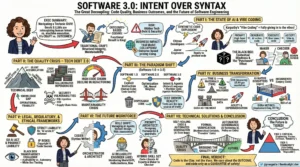
Software 3.0: Intent Over SyntaxJan 11Written By Priyanka VergadiaMy job is to guide the Fortune 100 CTOs on redefining their AI-powered Software Development Life Cycle (SDLC), and I can tell you this: the transformation is never just about the coding. It is fundamentally about the humans—the developers evolving into architects, the designers prompting prototypes into existence, and the project managers shifting from timeline guardians to outcome owners. It is about re-engineering your entire process, evolving your talent stack, and rigorously defining business outcomes in a world of infinite leverage.But amidst the strategy, one thing is palpable in every boardroom I enter, and that is the fear. It is the fear that in our rush to embrace "vibe coding" and autonomous agents, we are trading structural integrity for speed—building "black box" systems that work perfectly today, but that no human on the team truly understands how to fix tomorrow. When I sit in these boardrooms, the question isn't "Can AI write this code?" We know it can. The question is, "Who owns the outcome when the AI gets it wrong?"We are witnessing a tectonic shift from Craftsmanship to Outcomes. We are entering the era of Software 3.0, and if you look at the sketchnote I created to map this territory, you'll see why this is the most disruptive moment in software engineering history.Software 3.0 Intent over SyntaxThe "Vibe Coding" Shift: When Syntax Becomes OptionalHere is the reality check I give my clients: We are moving from explicit instruction to Intent Architecture.Software 1.0 was about humans writing explicit logic (C++, Python). We cared deeply about the syntax.Software 2.0 was about optimization (Machine Learning), where we curated data to train opaque neural networks.Software 3.0 is about Generative Agency.Andrej Karpathy calls the current behavior "Vibe Coding." It’s a fascinating, terrifying cultural shift where developers "give in to the vibes." They prompt the AI, execute the code, and if it works, they accept it. They don't read the diffs. They don't check the syntax.For a junior developer or a startup prototyping a weekend project, this is magic. But for a Fortune 100 bank? It’s an existential risk. We are decoupling the creation of software from the understanding of software.The Quality Paradox: The Silent Debt of "Black Box" VelocityThe biggest lie in the industry right now is that "faster coding equals better business." The data tells a different story.While we are seeing massive spikes in velocity, we are seeing a parallel spike in Code Churn—code that is written and then deleted days later because it wasn't right. We are seeing a 9% increase in bug rates correlating with high AI adoption in some studies.This is Technical Debt 2.0. It’s not the kind of debt you knowingly take on to meet a deadline. It’s "Black Box Debt." It’s code that works, but nobody knows why. It’s filled with hallucinated dependencies and "copy-paste" patterns that bloat your infrastructure.The human toll here is real. I see developers burning out not from writing code, but from "Review Fatigue." They are shifting from Makers to Checkers, tasked with auditing thousands of lines of machine-generated logic. It’s mentally exhausting, and eventually, they just start clicking "Accept."The Business Pivot: RIP Time & MaterialsThis shift is breaking the economic backbone of the software services industry. For decades, we operated on Time and Materials (T&M). You paid for hours.But in a Software 3.0 world, hours are irrelevant. If I can generate a microservice in 10 minutes that used to take 10 hours, the T&M model collapses.We are moving to Outcome-Based Pricing. Look at Intercom’s Fin. They don’t charge you for the AI software; they charge you $0.99 per successful resolution. If the AI hallucinates, you don’t pay. This is the future. You are paying for the value delivered, not the code written.The Human Evolution: From Coders to OrchestratorsThis brings us back to the talent. What happens to the humans?I tell CTOs: Do not fire your juniors. Evolve them. The role of the "Coder" is splitting into two new, high-value archetypes:The Prompt Architect: This isn't just about writing clever text prompts. This is about System Design. These are the humans designing the "harness" that the AI lives in—the RAG pipelines, the context windows, the guardrails. They are the architects of intent.The AI Reliability Engineer (ARE): This is the most critical role of 2026. While the "Vibe Coders" are generating features, the ARE is building the safety net. They monitor for Model Drift, bias, and hallucinations. They don't test the code; they verify the outcome.The Verdict: Code is the ClayWe are heading toward a tiered future.Tier 1 (Commodity): Internal tools, prototypes, marketing sites. Here, "Vibe Coding" wins. We won't care about the code, only the outcome.Tier 2 (Critical): Banking cores, medical devices, flight systems. Here, the "How" matters more than ever. We will use Formal Verification and strict human oversight to ensure that the "Black Box" doesn't kill us.My final advice to leaders is this: Code is the Clay, not the Vase. In the past, we obsessed over the fingerprints on the clay. In the future, we only care if the vase holds water. But it takes a human hand to ensure that vase is solid enough to stand the test of time.Don't let the fear paralyze you. Let it drive you to build better governance, better talent, and better outcomes.

Read more »

AI

The 5 AI Engineer Team Roles

The 5-Layer AI Team ArchitectureIf you look at a job board today, you will see a flood of listings for "AI Engineers." But if you look at the architecture of a successful AI product, you rarely see a single "engineer" doing the work. You see a pipeline. You see a distributed system of human capital where context switching is the enemy of progress.1. The Data Chef (Data Engineering)In the real world, this is the realm of Spark, Airflow, and Kafka. The technical challenge here is throughput and consistency. The Data Chef isn't worried about "accuracy" in a statistical sense; they are worried about schema drift and data lineage. If the raw data ingestion pipeline has high latency, the real-time inference model downstream starves. They build the "kitchen"—the Data Lakehouse—ensuring that `Raw Data` is transformed into `Feature Store` ready vectors.2. The Treasure Hunter (Data Science)This role is often confused with engineering, but the output is fundamentally different. The output of an Engineer is code; the output of a Scientist is insight. They deal in p-values and confidence intervals. The critical step in the sketch is "Make Tools" (Feature Engineering). This is the process of converting domain knowledge into numerical representation. The trade-off here is Exploration vs. Exploitation—how much time do we spend searching for a better model architecture versus shipping the one we have?3. The AI Builder (Machine Learning Engineer)This is where the Jupyter Notebook dies and the Microservice is born. The ML Engineer refactors the Data Scientist's experimental code into production-grade Python or C++. They care deeply about inference latency and memory footprints. They ask: "Can this Transformer run on a CPU instance to save costs?" or "How do we quantize this model without losing accuracy?" Their workflow in the sketch—Put Together -> Make Faster -> Set Up—is essentially the containerization and optimization pipeline.4. The AI Pit Crew (MLOps Engineer)This is the most undervalued role in early-stage startups. In traditional software, code behaves deterministically. In AI, code depends on data, which changes constantly. This is called Data Drift or Concept Drift. The Pit Crew builds the automated infrastructure that detects when the model's performance drops (Monitor), triggers a new training run (Re-Train), and pushes the new binary to production (Auto-Deploy). If your AI strategy doesn't have a Pit Crew, you don't have a product; you have a ticking time bomb of degradation.5. The AI Inventor (AI Researcher)While the Builder uses `from transformers import AutoModel`, the Inventor is reading ArXiv papers to understand the math behind the attention mechanism. They operate on a longer time horizon. Their work involves high failure rates because they are testing unproven hypotheses. They aren't optimizing for latency; they are optimizing for state-of-the-art (SOTA) benchmarks.When building your team, stop looking for a "Unicorn" who can do all five. You wouldn't hire a plumber to wire your house, even if they both work in construction. Respect the architecture. Respect the specialized tooling required for each stage. Build the kitchen, then hire the cooks.

Read more »

Uncategorized

REST vs. GraphQL

REST vs. GraphQLJan 1 Written By Priyanka VergadiaWhen we talk about API architecture, we often get lost in the weeds of HTTP verbs, status codes, and schema definitions. But at its core, API design is about logistics. It is the logistics of moving data from a server to a client as efficiently as possible. To explain the fundamental difference between REST (Representational State Transfer) and GraphQL, I created the sketchnote. It compares a traditional "REST-aurant" assembly line with a modern GraphQL "Smart Kiosk." Let's move beyond the drawing and analyze the deep technical implications of these two approaches.1. The REST-aurant: Resource-Oriented RigidityIn the sketch, the REST side is depicted as a counter service where you must visit different stations to assemble your meal. In technical terms, REST is Resource-Oriented. Every entity in your database (User, Post, Comment, Order) usually has its own URI (Uniform Resource Identifier). The Latency Tax (Multiple Round Trips)If you are building a dashboard that displays a User's name and their last 5 Orders, a pure REST implementation often requires a "waterfall" of requests:1. `GET /users/123` (Wait for response... receive User ID)2. `GET /users/123/orders` (Wait for response...)In the analogy, this is the stick figure running from the Crust counter to the Sauce counter. On a high-speed fiber connection, this is negligible. On a spotty 3G mobile network, each round trip (RTT) adds significant latency. The user stares at a loading spinner because the network protocol forces sequential fetching. The "Olives" Problem (Over-fetching)Look at the pizza box in the REST section labeled "Over-fetching." The customer didn't want olives, but the restaurant includes them in every box. In REST, the server defines the response structure. If the `/orders` endpoint returns the order ID, date, price, shipping address, billing address, and tracking info, but your mobile view only needs the price, you are downloading kilobytes of useless data. This "data waste" drains battery life and clogs bandwidth.2. The GraphQL Kiosk: Client-Driven FlexibilityGraphQL, developed by Facebook, was designed specifically to solve the mobile data fetching issues described above. In the sketch, it is represented as a "Smart Kiosk."One Endpoint to Rule Them AllInstead of thousands of endpoints (`/users`, `/products`, `/orders`), GraphQL exposes a single endpoint, usually `POST /graphql`. The Query LanguageThe client sends a string describing the data shape it needs:```graphqlquery { user(id: 123) { name orders { product price } }}```This solves the Under-fetching problem. You don't "forget the cheese" because you can traverse the graph (User -> Orders -> Product) in a single request. The server parses this query and returns a JSON payload that mirrors the query structure exactly.The Chef (Resolvers)On the right side of the sketchnote, you see a "GraphQL Chef" picking ingredients from shelves. This represents the **Resolver** functions in your backend code. While REST maps a URL to a controller, GraphQL maps a field to a function. * The `user` field resolver hits the Users Database.* The `orders` field resolver might hit a completely different Microservice.To the client, it looks like a single unified data source. Behind the scenes, the "Chef" is orchestrating a complex gathering of ingredients.3. If GraphQL is so efficient, why do we still use REST?1. Caching Complexity: HTTP caching is built into the fabric of the web. In REST, a browser or CDN can easily cache `GET /crust`. In GraphQL, everything is a `POST` request, which is not cacheable by default. You have to implement complex client-side caching (using tools like Apollo or Relay).2. The Complexity Shift: GraphQL simplifies the client code but complicates the server code. You have to manage schema definitions, type safety, and potential performance bombs (like highly nested queries that can crash your database).ConclusionThink of REST as a set of pre-packaged meal boxes. They are easy to distribute, standardized, and great if you like exactly what's in the box. Think of GraphQL as a personal chef. It requires more setup and communication, but you get exactly the meal you want, hot and fresh, in one sitting.Choose the architecture that fits your users best.

Read more »

Cart

Your cart is empty.

Start Shopping