Author: Priyanka Vergadia

Uncategorized

Traditional AI vs Generative AI vs Agentic AI

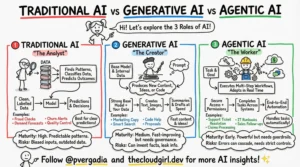
```markdown# AI's Evolution: From Recipes to Robots (and Beyond!) 🤖✨Have you ever wondered if all AI is the same? It's easy to get confused with all the tech talk! Think of AI like a big, diverse family, with different members having unique superpowers. Let's break down the three main types you're hearing about today: Traditional, Generative, and Agentic AI, so you can tell them apart like a pro!### Key Takeaways:‍ ‍*Traditional AI (The Rule Follower):** Imagine a super-smart vending machine! This AI is brilliant at following exact rules and instructions to do very specific tasks. It knows exactly what to do when X happens (like checking a credit card for fraud patterns or playing chess). It's amazing for problems with clear, defined steps, but it can't invent new things or think outside its instruction book.‍ ‍*Generative AI (The Creative Storyteller):** This is the AI that can write poems, draw pictures, or even compose music! Think of it like a highly imaginative artist who's seen millions of examples. Instead of following strict rules, it learns patterns from vast amounts of data and uses those patterns to create brand new, original content that looks and sounds real. It predicts what should come next, making magic appear!‍ ‍*Agentic AI (The Goal Achiever):** Picture a super-efficient personal assistant! An Agentic AI doesn't just generate text or follow rules; it has a goal and actively works to achieve it. It can plan steps, use various "tools" (like searching the internet, sending emails, or running code), observe the results, and adapt its strategy until the job is done. It's about proactive problem-solving and taking action!### Conclusion:So, there you have it! From rule-following calculators to creative artists and proactive assistants, AI is evolving rapidly. Each type brings unique strengths to the table, helping us solve different kinds of problems. The next time you hear about AI, you'll know exactly which family member they're talking about! Check out the accompanying sketchnote for a visual guide!```

Read more »

Uncategorized

13 AI Jobs That Will Explode in 2026: A Complete Career Guide

3 AI Jobs That Will Explode in 2026: A Complete Career GuideNov 27Written By Priyanka VergadiaAre you worried that you’ve missed the boat on the AI revolution? Or maybe you think you need to be a coding wizard to get a foot in the door? Think again. In this article let’s talk about the AI job market which is vast, and more than half of the emerging roles don't even require you to write complex code. While everyone fights over the obvious "software engineer" titles, there is an entire ecosystem of high-paying opportunities hiding in plain sight.Here is a breakdown of the 13 major AI career paths that are set to explode by 2026, ranging from deep technical roles to creative and ethical positions. 1. Data EngineerEvery impressive AI system begins with one thing: data. Data Engineers are the "plumbers" of the AI world. They build and maintain the massive pipelines that collect, clean, and transform raw, messy data into something usable. If you love building robust systems and bringing order to chaos using tools like SQL and Python, this is for you2. Data ScientistOnce the data is clean, the Data Scientist steps in. Think of them as the Sherlock Holmes of the industry. They analyze complex datasets to identify trends, build statistical models, and extract insights that drive business decisions. This role bridges the gap between raw numbers and actionable strategy3. Machine Learning Engineer (MLE)The MLE is the builder. They take the models designed by researchers or data scientists and turn them into scalable, production-ready applications. Their focus is less on pure research and more on implementation, optimization, and ensuring the AI works in the real world4. AI EngineerThis is a perfect blend of software engineering and AI. Instead of building models from scratch, AI Engineers focus on integrating existing models (like GPT-4 or Claude) into apps and websites. They build the APIs and backends that make AI accessible to the average user5. ML ResearcherThese are the academics pushing the boundaries of what is possible. ML Researchers design novel algorithms and experiment with new architectures, often publishing their findings in academic papers. This role typically requires a PhD and a deep passion for mathematics and solving unsolved problems6. NLP EngineerNatural Language Processing (NLP) Engineers teach computers to understand and generate human language. From chatbots to translation apps, they use deep learning to help machines communicate with us. A strong grasp of linguistics and Python libraries is crucial here7. Computer Vision EngineerThese engineers give machines the power to "see." They build models for facial recognition, autonomous vehicles, and medical imaging. If you are interested in how machines interpret images and video using Convolutional Neural Networks (CNNs), this is your domain8. AI Product ManagerAI isn't just about code; it's about products. AI Product Managers sit at the intersection of business, tech, and user experience. They define what to build and why, ensuring that AI capabilities translate into features that actually solve user problems9. AI EthicistAs AI becomes more powerful, ensuring it is fair and unbiased is critical. AI Ethicists focus on the societal impact of technology, identifying biases and developing guidelines for responsible development. Backgrounds in philosophy, law, or sociology are often perfect for this role10. MLOps EngineerMLOps Engineers are the unsung heroes who bridge development and operations. They build the infrastructure that allows models to be deployed, monitored, and updated continuously, ensuring reliability in production11. Cloud AI ArchitectThese architects design the overall cloud infrastructure for AI projects. They choose the right services (compute, storage, databases) from providers like AWS or Azure to ensure systems are scalable, secure, and cost-effective12. AI Trainer / Data AnnotatorAI models need human guidance to learn. AI Trainers meticulously label data—like tagging images or categorizing text—to create high-quality datasets. While often an entry-level role, it is absolutely vital for model accuracy13. Prompt EngineerWith the rise of Generative AI, Prompt Engineering has emerged as a critical capability. It involves crafting precise prompts to get the best output from large language models. While often described as a job, it is quickly becoming a universal skill that everyone needs to masterHow to Get StartedYou don't need a computer science degree to break into this field. Whether through online bootcamps, self-study, or transitioning from a related field like psychology (great for AI Ethics!), there is a path for you.

Read more »

Uncategorized

Who is Reviewing the Code AI is Writing?

Who is Reviewing the Code AI is Writing?Written By Priyanka VergadiaWe don’t talk enough about the "hidden" phase of the Software Development Life Cycle (SDLC). We talk about writing code (the creative part) and shipping code (the dopamine hit). But the reality is that developers spend significantly more time reading, debugging, and reviewing code than they do writing it.Generative AI like GitHub Copilot has solved the "Blank Canvas" problem—it helps you write code fast. But speed often comes at the cost of precision. Even the best LLMs hallucinate, introduce subtle logic errors, or ignore edge cases.This creates a new bottleneck: Who validates the AI?If you are relying on your human peers to catch every AI-generated race condition in a Pull Review, you are slowing down the team. The solution is an Agentic Workflow: pairing a "Creative Coder" agent (Copilot) with an "Analytical Reviewer" agent (CodeRabbit CLI).Here is how to set up a closed-loop AI development cycle that catches bugs locally before you ever git commit.You can give these a try here: 🔗 Try CodeRabbit 🔗 GitHub CopilotThe Architecture: Builder vs. ReviewerTo understand why you need two tools, you have to understand their roles:The Builder (GitHub Copilot): Integrated into the IDE. It is optimized for speed, context prediction, and syntax generation. It is the "Creative Partner."The Reviewer (CodeRabbit CLI): Runs in the terminal. It is optimized for analysis, security scanning, and logic verification. It looks for what’s missing (validation, type safety, error handling).When combined, you stop shipping "Draft 1" code to production. GitHub Copilot also has a code review agent but in this article we are learning about CodeRabbit. The Workflow: A Live ExampleLet’s look at a real-world scenario involving a Python-based Flappy Bird application. The goal is to add a feature that tracks player performance (blocks passed and accuracy).Step 1: The Build (GitHub Copilot)Inside VS Code, we prompt Copilot Chat to generate a new class.Prompt:"Create a new file named player_insights.py where write a logic so that we can provide insights to the player about their performance on how many blocks he/she passed with how much accuracy."Copilot Output:It generates a functional PlayerInsights class. It has methods for blocks_progress and accuracy. To the naked eye, it looks fine. It runs.codePythonclass PlayerInsights: def __init__(self, blocks_passed, total_blocks, correct_actions, total_actions): self.blocks_passed = blocks_passed self.total_blocks = total_blocks # ... rest of initStep 2: The Analysis (CodeRabbit CLI)Before committing this, we run the CodeRabbit CLI locally. This tool analyzes uncommitted changes against high-level coding standards and logic patterns.Command:codeBashcoderabbit --prompt-onlyNote: The --prompt-only flag is key here. It asks CodeRabbit to generate a critique without automatically applying the fix, giving you control.The Catch:CodeRabbit instantly flags issues that Copilot missed. It’s not just looking for syntax errors (a linter could do that); it’s looking for logic and robustness.CodeRabbit Feedback:Missing Type Hints: The class lacks type annotations, making it harder to maintain.Input Validation (Critical): The __init__ method accepts any values. CodeRabbit points out that total_blocks or total_actions could be negative or zero, which would cause invalid statistics or ZeroDivisionError later in the math.Documentation: No docstrings.Step 3: The Closed Loop (AI-to-AI Prompting)This is the "Agentic" part of the workflow. Instead of manually fixing these issues, we feed the Analytical AI's feedback directly back into the Creative AI.We copy CodeRabbit’s critique and paste it into Copilot Chat.Prompt to Copilot:[Paste CodeRabbit feedback]: "Ensure the __init__ does not validate inputs... update constructor to validate that blocks_passed are non-negative integers... ensure get_insights return type is annotated..."Step 4: The ResultCopilot rewrites the code based on the strict constraints provided by CodeRabbit.The Optimized Code:codePythonfrom typing import Dict, Union class PlayerInsights: """ Provides insights into a player's performance. """ def __init__(self, blocks_passed: int, total_blocks: int, ...): # Validation Logic added by AI Loop if total_blocks < 0 or total_actions < 0: raise ValueError("Total blocks must be non-negative") self.blocks_passed = blocks_passed # ...We run coderabbit --prompt-only one last time.Result: Review completed. No issues found.Why This MattersYou might ask, "Why not just ask Copilot to write secure code in the first place?"Because prompting is hard, and humans forget edge cases. If you ask Copilot for a feature, it prioritizes the feature. If you use CodeRabbit, it acts as a specialized adversarial agent dedicated solely to finding faults.By using this pairing, you achieve three things:Pre-PR Hygiene: You aren't wasting your senior engineer's time on code reviews pointing out missing error handling. The AI caught it locally.Contextual Awareness: Unlike a static analyzer, these tools understand the intent of the code. CodeRabbit didn't just say "variable unused"; it explained why the logic was unsafe (potential division by zero).Platform Independence: CodeRabbit runs in the CLI. It works in VS Code, JetBrains, or vim. It integrates into CI/CD pipelines to block bad merges automatically.The future of development isn't just "AI writes the code." It is AI builds, AI validates, Human architects.FeatureGitHub CopilotCodeRabbit CLIThe ComboPrimary RoleGeneration (Creative)Review (Analytical)End-to-End DevContextIn-IDE, File-levelLocal changes & RepositoryFull ContextSecurityBasic patternsVulnerability & Logic scanningSecure by DesignWorkflowWrite -> DebugReview -> FixLoop -> ShipStop treating AI tools as isolated chat bots. Chain them together. Let the Builder build, let the Reviewer review, and ship production-ready code faster.

Read more »

Uncategorized

Why Spec-Driven Development is the Future of AI Coding

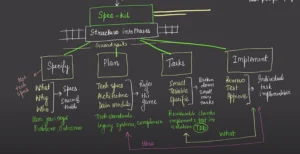
Why Spec-Driven Development is the Future of AI CodingWritten By Priyanka VergadiaWe're living through an incredible moment where AI can write decent code and build entire applications in minutes. But while everyone's obsessing over better prompts and flashier demos, most developers are missing the real game-changer: specifications.The harsh reality? AI coding often feels like a beautiful, chaotic dance where you end up debugging code you didn't write, playing endless rounds of "prompt tennis" with your AI assistant. After 47 prompts, you're thinking, "I could have built this myself in half the time."There's a better way. GitHub's new open-source tool SpecKit is bringing spec-driven development to the forefront of AI coding—and it's exactly what we need. Here is a video I did recently on this topic showing a demo. The Problem with "Vibe Coding"When you throw a vague prompt like "build me a React to-do app with drag and drop, local storage, and dark mode" at your AI assistant, you're essentially asking it to be a mind reader. You give it a high-level idea and expect it to somehow know:All the implementation detailsEdge cases you haven't thought ofYour preferred architecture patternsYour exact requirements and constraintsIt's like walking into a coffee shop and saying "I want something caffeinated that tastes good," then expecting the barista to nail your exact preference for a medium roast oat milk cortado with a dash of cinnamon.AI is incredible at following instructions, but terrible at filling in the massive gaps we leave.Enter Spec-Driven DevelopmentSpec-driven development flips the script entirely. Instead of specifications being just scaffolding you build and discard, they become executable blueprints that directly generate working implementations. The spec isn't documentation anymore—it's the blueprint that builds your software.What is Spec-kit?SpecKit structures this approach into four clear phases that act as guardrails for both you and your AI:Phase 1: SpecifyDescribe not just what you want to build, but why you're building it and who it's for. This creates a detailed specification document that becomes your single source of truth.Focus on:User journeys and experiencesWho will use this app?What problems does it solve?How will users interact with it?What does success look like?Phase 2: PlanGet technical. Define your tech stack, architectural decisions, and data models. Set the rules of the game before the AI starts playing.Include:Technology standards and constraintsIntegration requirementsPerformance targetsCompliance needsMultiple plan variations to compare approachesPhase 3: Break Down TasksInstead of one giant "build me an app" prompt, you get a prioritized list of small, testable, specific tasks. Each task is focused enough that the AI can nail it in one shot with minimal debugging.Transform vague requests like "build authentication" into concrete tasks like "create a user registration endpoint that validates email format."Phase 4: ImplementThe AI works through each task individually. You review, test, and approve each piece before moving on. Instead of reviewing thousands of lines of code dumps, you review focused changes that solve specific problems.The AI knows:What to build (from the specification)How to build it (from the plan)Exactly what to work on (from the tasks)Why This Actually WorksThis approach succeeds where pure prompting fails because it addresses a fundamental truth about language models: they're exceptional at pattern completion but terrible at mind reading.When you provide clear specifications, technical plans, and focused tasks, you're giving the AI actual clarity instead of forcing it to guess. Instead of mind-reading your intent, it has concrete direction.Use Cases1. Greenfield ProjectsStarting something completely new? Spend time creating a spec and plan upfront to ensure the AI builds what you actually intend, not just some generic solution based on common patterns.2. Feature Work in Existing ProjectsThis is where spec-driven development becomes incredibly powerful. Adding features to complex existing codebases is hard, but creating a spec forces clarity on how new features should interact with everything already there.3. Legacy ModernizationWhen rebuilding legacy systems where original intent is lost to time, you can capture essential business logic in a modern spec, design fresh architecture in the plan, and let AI rebuild without carrying forward technical debt.The Bottom LineIf you're tired of playing prompt roulette with your AI coding assistant, spec-driven development offers a structured path forward. SpecKit is completely open-source and ready to use right now with GitHub Copilot, Claude Code, Gemini, and Cursor.The future of AI coding isn't just about better prompts—it's about better specifications. When we give AI the clarity it needs, it can finally deliver on its promise of truly collaborative development.Stop asking AI to read your mind. Start giving it the blueprints it needs to build exactly what you envision.

Read more »

Uncategorized

What is GitHub Spark: The Full Demo Inside

Vibe coding on steroids with GitHub Spark. 🚀 GitHub Spark Just Changed Everything About App Development GitHub has just launched Spark, an AI-powered coding platform that turns natural language descriptions into fully functional web applications. No coding required, no setup headaches, and one-click deployment to production. This isn't just another AI coding assistant – it's a complete paradigm shift in how we build software. ⚡ What You'll Learn: What GitHub Spark is and how it works Live demonstration of building multiple apps with just natural language Why this matters for developers, designers, and entrepreneurs Honest breakdown of pricing and limitations The future of AI-powered development 🔥 Key Highlights: Vibe Coding Full-stack applications generated from plain English Integrated with Claude Sonnet 3.5, GPT-4o, and other leading AI models One-click deployment with enterprise-grade hosting Complete GitHub ecosystem integration Real-time live previews and instant iteration 💰 Pricing & Access: Currently available in public preview for GitHub Copilot Pro+ subscribers ($39/month) Includes 375 Spark messages, unlimited manual editing, hosting, and AI inference 🛠️ Perfect For: ✅ Rapid prototyping and MVP development ✅ Internal tools and personal projects ✅ Learning full-stack development concepts ✅ Non-technical founders validating ideas ✅ Experienced developers eliminating boilerplate work

Read more »

Uncategorized

Complete Beginners Guide to Hugging Face

hey everyone and welcome back to mychannel where we talk about cloud techand AI And today we're diving into aplatform that you must know about ifyou're doing anything to do with AI Itis Hugging Face Now Hugging Face hasbeen called the GitHub of machinelearning and for all the great reasonsIt is literally becoming the communitywhere AI models and creations are sharedacross everybody So by the end of thisvideo you will understand what it isexactly and why it matters to you evenif you are not somebody who codes everyday So stick around All right So this isDemothe hugging face homepage And the firstthing that you'll notice in here istheir tagline which is the AI communitybuilding the future That really sums upwhat they're really about right it's acollaborative platform where people aresharing AI tools models data sets andeven AI apps Now if you scroll downyou're able to see features models thatare trending and recently uploadedcontent Um and this gives you the tasteof what's popular in the AI communityAnd before we dive deeper I wouldrecommend that you sign up and create anaccount because you would need one Uhmost of the content you'll be able tojust see um without uh having an accountbut if you want to use the models andsave your favorites and things like thatyou will need an account Now um goinginto the models tab this is where allthe models are found You can see thatthey've got millions of models in hereand you can filter them by differenttasks in the categories like naturallanguage processing and classificationand audio and tabularAnd you could also filter them bylibraries and data sets and languagesandlicenses Now here let's check out uMicrosoft's popular um 54 reasoningmodel And I wanted to see how far I cango with this So each model has got itsown page with documentation and Iclicked on deploy and it literally justtook me right away into the machinelearning studio in Azure AI and I wasasked to create a workspace and as soonas I gave it all the details with thename and everything um it was able tocreate that workspace for me anddeployed that model the 54 model um fromhugging face into Azure AI machinelearning studioThat was absolutely amazing I just itjust took me a few clicks to do this Andyou can see it's creating that now Andonce it is created I can go to theworkspace And in this workspace if Iclick on endpoints if I click onendpoints I'm able to go into AzureOpenAI service And that's where my 54endpoint is And if I want to use thisendpoint I can click on continue Andthat takes me into Azure AI Foundrywhere I'll be able to um experiment withthis with this deployed model It tellsme my target URL the key that it createdfor me I'm able to see how to use thiswith my API key and um some samples ofhow to use this model Um I am also ableto go play with it in the playground andtest it out So I gave it a prompt Um andum I was really trying to go with likethe dog traveling uh to the mountainswhere he meets a robot and um that robotis helping a bird um survive in the coldum and they all become friends for lifeSo um I was just playing around withwith um a prompt but the idea here isthat you're able to go from looking at amodel in hugging phase to actually ableto deploy that model in Azure AI founduh foundry and uh Azure AI machinelearning studio Um and then I clicked ondeploy that um endpoint as a webapplicationAnd right now that is what you're seeingum with the Azure AI web applicationbeing created um as a part of thisdeployment It's able to deploy a webapplication right from that um thatmodel and endpoint that we just createdOnce the model this takes seconds maybea minute or so to to get created withthe deployment assets and stuff thingslike that And once the app is deployedI'm able to see that app in Azure AIfoundry in my web apps section There itis the 54 experiment I click on that appand there we have it An entire chatapplication built from hugging facechoosing a model 54 reasoning goes intoAzure AI machine learning studio foundryand builds it out for me as a webapplication Going back into our huggingWalkthroughface interface we're able to uh let'slook at the the the data sets tab Nowthis tab is where all your data sets areThere are thousands of these in thereand um you can preview the samples inthere You can also filter the data setsof through languages tasks libraries allof that Um and then if you click on oneyou're able to actually see the samplesof that of the data set um and startusing them Um and now the next thing isone of my favorites which is the spacessection of hugging face Now this iswhere things get really really excitingespecially for non-coders So spaces isthis interactive AI application thatanyone can use right within the huggingface browser experience And think ofthem as like readytouse AI tools Iclicked on one here which is calleddescribe anything um in uh by created byNvidia And when you go into that modelagain right in the browser I'm not doinganything else I can upload an image Anduh once I do that um I can type mydescription and I can get my descriptionfor for the regions of my images This ismy dog sitting on a chair in a park Andum I selected different parts of thatimage And um this model is able to thisdemo is able to tell me what are inthese different parts Um I selected thetree first and then I selected my doghimself and uh it was able to do areally good job at telling me what is inthis image Um and if I wanted I can takethis space and deploy it for myselfwhether locally or um or in cloud Um andbut before we do that let's look atanother example So I go back into myspaces I can really um you knowcategorize by image generation 3Dmodeling all the different options uptop Um and I went into stable diffusionwhich is another one of the very commonand very popular libraries in gener ofuh image generation models And um Itested this one out right here in spaceswith a prompt serene lake at sunset withmountains in the background and a goldenretriever watching the sunset I let itgenerate the image And there we have itUm I don't know if I like the first oneThe second one's okayUm but it it did what I wanted it to doUm and let's say I'm happy with withwhat it's I love the third and thefourth images Um they really do what Iasked it to do The the good part thebest part the part that I want to showyou is I can run this space Let's say Ilike it I can run it locally I can runit um I can clone the repo um and um andstart working with it right from herejust like how we deployed the um thefive for model in Azure AI and uh withthat um let's look at the docs the docssection is uh your knowledge center thisis where you are going to get deepdeeper technical information the docsare organized by different categorieslike the client libraries deploymentinterface core ML libraries like thetransformers which is one of the veryfamous libraries diffusers tokenizers umand a lot more like radio Um and thenthe next thing the last thing I want totalk to you about is the communitysection This is where people askquestions and share ideas and learn Theblog part of the of the community isamazing you'll see a lot of peoplecontributing to the blogs and you'll seeum what's happening right now um and andwhat's hot right now Then the learnsection is one of my favorites The LLMcourse and the agent course are some ofthe best courses out there on AI andmachine learning right now The LLMcourse goes from transformers all theway up to fine-tuning And then the agentcourse covers everything from intro toagents to to a lot more So that myfriends was hugging face and we'vetoured every major section of theplatform Whether you are just curiousabout AI want to use existing models orare developing something with AI or wantto contribute hugging face is definitelya platform to check out Now go exploreAnd if you liked this video and found ithelpful please hit that like andsubscribe button to get more tech and AIcontent And drop a comment if you havequestions and which AI platform I shouldcover next And thank you for watchingSee you next timehey everyone and welcome back to mychannel where we talk about cloud techand AI And today we're diving into aplatform that you must know about ifyou're doing anything to do with AI Itis Hugging Face Now Hugging Face hasbeen called the GitHub of machinelearning and for all the great reasonsIt is literally becoming the communitywhere AI models and creations are sharedacross everybody So by the end of thisvideo you will understand what it isexactly and why it matters to you evenif you are not somebody who codes everyday So stick around All right So this isDemothe hugging face homepage And the firstthing that you'll notice in here istheir tagline which is the AI communitybuilding the future That really sums upwhat they're really about right it's acollaborative platform where people aresharing AI tools models data sets andeven AI apps Now if you scroll downyou're able to see features models thatare trending and recently uploadedcontent Um and this gives you the tasteof what's popular in the AI communityAnd before we dive deeper I wouldrecommend that you sign up and create anaccount because you would need one Uhmost of the content you'll be able tojust see um without uh having an accountbut if you want to use the models andsave your favorites and things like thatyou will need an account Now um goinginto the models tab this is where allthe models are found You can see thatthey've got millions of models in hereand you can filter them by differenttasks in the categories like naturallanguage processing and classificationand audio and tabularAnd you could also filter them bylibraries and data sets and languagesandlicenses Now here let's check out uMicrosoft's popular um 54 reasoningmodel And I wanted to see how far I cango with this So each model has got itsown page with documentation and Iclicked on deploy and it literally justtook me right away into the machinelearning studio in Azure AI and I wasasked to create a workspace and as soonas I gave it all the details with thename and everything um it was able tocreate that workspace for me anddeployed that model the 54 model um fromhugging face into Azure AI machinelearning studioThat was absolutely amazing I just itjust took me a few clicks to do this Andyou can see it's creating that now Andonce it is created I can go to theworkspace And in this workspace if Iclick on endpoints if I click onendpoints I'm able to go into AzureOpenAI service And that's where my 54endpoint is And if I want to use thisendpoint I can click on continue Andthat takes me into Azure AI Foundrywhere I'll be able to um experiment withthis with this deployed model It tellsme my target URL the key that it createdfor me I'm able to see how to use thiswith my API key and um some samples ofhow to use this model Um I am also ableto go play with it in the playground andtest it out So I gave it a prompt Um andum I was really trying to go with likethe dog traveling uh to the mountainswhere he meets a robot and um that robotis helping a bird um survive in the coldum and they all become friends for lifeSo um I was just playing around withwith um a prompt but the idea here isthat you're able to go from looking at amodel in hugging phase to actually ableto deploy that model in Azure AI founduh foundry and uh Azure AI machinelearning studio Um and then I clicked ondeploy that um endpoint as a webapplicationAnd right now that is what you're seeingum with the Azure AI web applicationbeing created um as a part of thisdeployment It's able to deploy a webapplication right from that um thatmodel and endpoint that we just createdOnce the model this takes seconds maybea minute or so to to get created withthe deployment assets and stuff thingslike that And once the app is deployedI'm able to see that app in Azure AIfoundry in my web apps section There itis the 54 experiment I click on that appand there we have it An entire chatapplication built from hugging facechoosing a model 54 reasoning goes intoAzure AI machine learning studio foundryand builds it out for me as a webapplication Going back into our huggingWalkthroughface interface we're able to uh let'slook at the the the data sets tab Nowthis tab is where all your data sets areThere are thousands of these in thereand um you can preview the samples inthere You can also filter the data setsof through languages tasks libraries allof that Um and then if you click on oneyou're able to actually see the samplesof that of the data set um and startusing them Um and now the next thing isone of my favorites which is the spacessection of hugging face Now this iswhere things get really really excitingespecially for non-coders So spaces isthis interactive AI application thatanyone can use right within the huggingface browser experience And think ofthem as like readytouse AI tools Iclicked on one here which is calleddescribe anything um in uh by created byNvidia And when you go into that modelagain right in the browser I'm not doinganything else I can upload an image Anduh once I do that um I can type mydescription and I can get my descriptionfor for the regions of my images This ismy dog sitting on a chair in a park Andum I selected different parts of thatimage And um this model is able to thisdemo is able to tell me what are inthese different parts Um I selected thetree first and then I selected my doghimself and uh it was able to do areally good job at telling me what is inthis image Um and if I wanted I can takethis space and deploy it for myselfwhether locally or um or in cloud Um andbut before we do that let's look atanother example So I go back into myspaces I can really um you knowcategorize by image generation 3Dmodeling all the different options uptop Um and I went into stable diffusionwhich is another one of the very commonand very popular libraries in gener ofuh image generation models And um Itested this one out right here in spaceswith a prompt serene lake at sunset withmountains in the background and a goldenretriever watching the sunset I let itgenerate the image And there we have itUm I don't know if I like the first oneThe second one's okayUm but it it did what I wanted it to doUm and let's say I'm happy with withwhat it's I love the third and thefourth images Um they really do what Iasked it to do The the good part thebest part the part that I want to showyou is I can run this space Let's say Ilike it I can run it locally I can runit um I can clone the repo um and um andstart working with it right from herejust like how we deployed the um thefive for model in Azure AI and uh withthat um let's look at the docs the docssection is uh your knowledge center thisis where you are going to get deepdeeper technical information the docsare organized by different categorieslike the client libraries deploymentinterface core ML libraries like thetransformers which is one of the veryfamous libraries diffusers tokenizers umand a lot more like radio Um and thenthe next thing the last thing I want totalk to you about is the communitysection This is where people askquestions and share ideas and learn Theblog part of the of the community isamazing you'll see a lot of peoplecontributing to the blogs and you'll seeum what's happening right now um and andwhat's hot right now Then the learnsection is one of my favorites The LLMcourse and the agent course are some ofthe best courses out there on AI andmachine learning right now The LLMcourse goes from transformers all theway up to fine-tuning And then the agentcourse covers everything from intro toagents to to a lot more So that myfriends was hugging face and we'vetoured every major section of theplatform Whether you are just curiousabout AI want to use existing models orare developing something with AI or wantto contribute hugging face is definitelya platform to check out Now go exploreAnd if you liked this video and found ithelpful please hit that like andsubscribe button to get more tech and AIcontent And drop a comment if you havequestions and which AI platform I shouldcover next And thank you for watching

Read more »

Cart

Your cart is empty.

Start Shopping